Re,
Il y a beaucoups de monde sur votre ordinateur.
Avec tous ces cracks et keygens sur ce système, il ne faut pas s'étonner ensuite d'avoir des soucis !
Les cracks et keygens sont des vecteurs de malwares et d'infections.
Le danger des cracks !De plus il est important de vérifier et de mettre à jour les logiciels à risque sur son ordinateur.
De nombreuses infections se propagent via des failles logiciels tels que :Flash Player, et Java.
Nous allons nettoyer le système pollué par ces indésirables.
Commencer pas supprimer vos Cracks,Keygens.
C:\
ProgramData\gamigo\Fiesta Online FR\ressystem\Action\
B_CrackerHumar.dat =>.Crack,Keygen
C:\
Users\All Users\gamigo\Fiesta Online FR\ressystem\Action\
B_CrackerHumar.dat =>.Crack,Keygen
C:\
ProgramData\gamigo\Fiesta Online FR\ressystem\Action\
B_CrackerHumar.dat =>.Crack,Keygen
C:\
Users\All Users\gamigo\Fiesta Online FR\ressystem\Action\
B_CrackerHumar.dat =>.Crack,Keygen
Désinstalle via Panneau de configuration >> Désinstaller un programme (si présents) :
SmarterPowersupmajt4pcFindoPolisFortunitasCertifiedToolbarPirritSuggestorAkamaiHDBoxoreBoxore ClientSweetIMLes versions obsolètes JAVA
Java 7 Update 25
Java 7 Update 71
Si vous ne trouvez pas les programmes passer à la suite
Fermez toutes les applications en cours (notamment votre navigateur)
Désactivez vos protections (Antivirus et par-feu)
- Cliquez sur l'icône ZHPFix,présent sur votre Bureau
pour vista/W7/W8 clique-droit > exécuter en tant qu'administrateur
- Surlignez tout le texte ci-dessous puis cliquez droit Copier
Script ZHPFix
C:\Users\user\AppData\Roaming\Tencent
C:\Users\user\AppData\Roaming\uTorrent
C:\Users\user\AppData\Local\Updater12765
R5 - HKCU\Software\Microsoft\Windows\CurrentVersion\Internet Settings,ProxyOverride = <local>;*origin.com;*ea.com;*akamaihd.net
R5 - HKCU\Software\Microsoft\Windows\CurrentVersion\Internet Settings,ProxyServer = http=127.0.0.1:39999
O2 - BHO: QPMIEHelper [64Bits] - {50F4150A-48B2-417A-BE4C-C83F580FB904} . (...) -- C:\Program Files (x86)\Common Files\Tencent\QQPhoneManager\2.0.201.3198\npQQPhoneManagerExt.dll (.not file.)
O2 - BHO: QQMiniDL Helper Class [64Bits] - {C9C7334B-5657-41e1-8F79-F6AACECA05F4} . (...) -- C:\Program Files (x86)\Common Files\Tencent\QQMiniDL\60\Browser\QQIEHelper01.dll (.not file.)
O2 - BHO: AccountProtect [64Bits] - {DDD362CF-523B-4BC9-8FDC-58F93B6BC945} . (...) -- C:\Users\user\AppData\Roaming\Tencent\QQ\QQAntiPhishing\AccountProtect.dll (.not file.)
O4 - GS\QuickLaunch [user]: ??QQ.lnk . (...) -- C:\Program Files (x86)\Tencent\QQ\QQProtect\Bin\QQProtect.exe (.not file.)
O4 - HKCU\..\Run: [QQ2009] C:\Program Files (x86)\Tencent\QQ\QQProtect\Bin\QQProtect.exe (.not file.)
O4 - HKLM\..\Wow6432Node\Run: [kxesc] C:\Program Files (x86)\Kingsoft\kingsoft antiviruskxetray.exe (.not file.)
O4 - HKUS\S-1-5-21-989034933-3172032642-1140050089-1000\..\Run: [QQ2009] C:\Program Files (x86)\Tencent\QQ\QQProtect\Bin\QQProtect.exe (.not file.)
O23 - Service: 9b07612c2abbdae.exe (9b07612c2abbdae.exe) . (...) - C:\Users\user\AppData\Local\ffa8db36a0ed45de21d5a2ad387d66a1\9b07612c2abbdae.exe (.not file.)
O23 - Service: a4807819c3b570d.exe (a4807819c3b570d.exe) . (...) - C:\Users\user\AppData\Local\ea8c01f6b71b28b29442f8c726d94996\a4807819c3b570d.exe (.not file.)
O23 - Service: APIFAT32OCR.exe (APIFAT32OCR.exe) . (...) - C:\Users\user\AppData\Local\APIFAT32OCR\APIFAT32OCR.exe (.not file.) => Fichier absent
O23 - Service: ApplicationClipboardShareware.exe (ApplicationClipboardShareware.exe) . (...) - C:\Users\user\AppData\Local\ApplicationClipboardShareware\ApplicationClipboardShareware.exe (.not file.)
O23 - Service: ApplicationCursorRegister.exe (ApplicationCursorRegister.exe) . (...) - C:\Users\user\AppData\Local\ApplicationCursorRegister\ApplicationCursorRegister.exe (.not file.)
O23 - Service: ApplicationInterpreterJRE.exe (ApplicationInterpreterJRE.exe) . (...) - C:\Users\user\AppData\Local\ApplicationInterpreterJRE\ApplicationInterpreterJRE.exe (.not file.)
O23 - Service: ArchiveMySQLUtility.exe (ArchiveMySQLUtility.exe) . (...) - C:\Users\user\AppData\Local\ArchiveMySQLUtility\ArchiveMySQLUtility.exe (.not file.)
O23 - Service: b698dfca6825ff3.exe (b698dfca6825ff3.exe) . (...) - C:\Users\user\AppData\Local\0854264e7ad464b8ad2da3c79b62ffbe\b698dfca6825ff3.exe (.not file.)
O23 - Service: CGIDLCFreeware.exe (CGIDLCFreeware.exe) . (...) - C:\Users\user\AppData\Local\CGIDLCFreeware\CGIDLCFreeware.exe (.not file.) => Fichier absent
O23 - Service: ClassInterpreterJRE.exe (ClassInterpreterJRE.exe) . (...) - C:\Users\user\AppData\Local\ClassInterpreterJRE\ClassInterpreterJRE.exe (.not file.)
O23 - Service: ClassSambaSymbolic.exe (ClassSambaSymbolic.exe) . (...) - C:\Users\user\AppData\Local\ClassSambaSymbolic\ClassSambaSymbolic.exe (.not file.)
O23 - Service: ClipboardFilePublic.exe (ClipboardFilePublic.exe) . (...) - C:\Users\user\AppData\Local\ClipboardFilePublic\ClipboardFilePublic.exe (.not file.)
O23 - Service: ClipboardRepositorySyntax.exe (ClipboardRepositorySyntax.exe) . (...) - C:\Users\user\AppData\Local\ClipboardRepositorySyntax\ClipboardRepositorySyntax.exe (.not file.)
O23 - Service: CommandDockPerl.exe (CommandDockPerl.exe) . (...) - C:\Users\user\AppData\Local\CommandDockPerl\CommandDockPerl.exe (.not file.)
O23 - Service: CursorFileGUI.exe (CursorFileGUI.exe) . (...) - C:\Users\user\AppData\Local\CursorFileGUI\CursorFileGUI.exe (.not file.)
O23 - Service: d56790885b23f02.exe (d56790885b23f02.exe) . (...) - C:\Users\user\AppData\Local\a9e5fab0dd5b3749ac20d9c4211e339b\d56790885b23f02.exe (.not file.)
O23 - Service: DatabaseFunctionWin32.exe (DatabaseFunctionWin32.exe) . (...) - C:\Users\user\AppData\Local\DatabaseFunctionWin32\DatabaseFunctionWin32.exe (.not file.)
O23 - Service: DLCRawTask.exe (DLCRawTask.exe) . (...) - C:\Users\user\AppData\Local\DLCRawTask\DLCRawTask.exe (.not file.)
O23 - Service: DLCRepositorySyntax.exe (DLCRepositorySyntax.exe) . (...) - C:\Users\user\AppData\Local\DLCRepositorySyntax\DLCRepositorySyntax.exe (.not file.)
O23 - Service: DockMotionScript.exe (DockMotionScript.exe) . (...) - C:\Users\user\AppData\Local\DockMotionScript\DockMotionScript.exe (.not file.)
O23 - Service: EncondingLogQuick.exe (EncondingLogQuick.exe) . (...) - C:\Users\user\AppData\Local\EncondingLogQuick\EncondingLogQuick.exe (.not file.)
O23 - Service: FinderMemoryMySQL.exe (FinderMemoryMySQL.exe) . (...) - C:\Users\user\AppData\Local\FinderMemoryMySQL\FinderMemoryMySQL.exe (.not file.)
O23 - Service: FreewarePrivacySymbolic.exe (FreewarePrivacySymbolic.exe) . (...) - C:\Users\user\AppData\Local\FreewarePrivacySymbolic\FreewarePrivacySymbolic.exe (.not file.)
O23 - Service: IconRubySprite.exe (IconRubySprite.exe) . (...) - C:\Users\user\AppData\Local\IconRubySprite\IconRubySprite.exe (.not file.)
O23 - Service: JAVARemoteSymbolic.exe (JAVARemoteSymbolic.exe) . (...) - C:\Users\user\AppData\Local\JAVARemoteSymbolic\JAVARemoteSymbolic.exe (.not file.)
O23 - Service: JAVASharewareSprite.exe (JAVASharewareSprite.exe) . (...) - C:\Users\user\AppData\Local\JAVASharewareSprite\JAVASharewareSprite.exe (.not file.)
O23 - Service: MacroScrollingSymbolic.exe (MacroScrollingSymbolic.exe) . (...) - C:\Users\user\AppData\Local\MacroScrollingSymbolic\MacroScrollingSymbolic.exe (.not file.)
O23 - Service: OpenScrollingStart.exe (OpenScrollingStart.exe) . (...) - C:\Users\user\AppData\Local\OpenScrollingStart\OpenScrollingStart.exe (.not file.)
O23 - Service: PathSymbolicThumbnail.exe (PathSymbolicThumbnail.exe) . (...) - C:\Users\user\AppData\Local\PathSymbolicThumbnail\PathSymbolicThumbnail.exe (.not file.)
O23 - Service: supmajt4pc_fr_1 (supmajt4pc_fr_1) . (...) - C:\Users\user\AppData\Local\majtuto4pc_fr_1\supmajt4pc_fr_1.exe (.not file.) => Infection PUP (PUP.AgenceExcusive)
O23 - Service: SyntaxTaskWiget.exe (SyntaxTaskWiget.exe) . (...) - C:\Users\user\AppData\Local\SyntaxTaskWiget\SyntaxTaskWiget.exe (.not file.)
O23 - Service: Update SmarterPower (Update SmarterPower) . (...) - C:\Program Files (x86)\SmarterPower\updateSmarterPower.exe (.not file.)
O23 - Service: Util SmarterPower (Util SmarterPower) . (...) - C:\Program Files (x86)\SmarterPower\bin\utilSmarterPower.exe (.not file.)
O23 - Service: WinRST (WinRST) . (...) - C:\Program Files (x86)\WinRST\WinRST.exe (.not file.)
O41 - Driver: (QMUdisk) . (. - .) - C:\Program Files (x86)\Tencent\QQPCMgr\10.3.15559.215\QMUdisk64.sys (.not file.)
O43 - CFD: 24/04/2013 - 15:53:06 - [] ----D C:\Users\user\AppData\Local\Updater12765
O45 - LFCP:[MD5.1CD22CE31457F08D9C16830E032CAE66] - 31/10/2014 - 13:02:07 ---A- - C:\Windows\Prefetch\CODECCOMMANDLOG.EXE-DD41D6EF.pf
O45 - LFCP:[MD5.67BEA6945FDC5BF69DE4D0EEBC23407C] - 31/10/2014 - 13:01:57 ---A- - C:\Windows\Prefetch\PIRRITUPDATER.EXE-13033E5F.pf
O45 - LFCP:[MD5.1A943C98EC26F3B881D97165531D059B] - 31/10/2014 - 13:01:57 ---A- - C:\Windows\Prefetch\PIRRITUPDATER.TMP-C9FB602D.pf
O53 - SMSR:HKLM\...\startupreg\lollipop [Key] . (...) -- c:\users\user\appdata\local\lollipop\lollipop.exe (.not file.)
SS - | Auto 10/07/1658 0 | (supmajt4pc_fr_1) . (...) - C:\Users\user\AppData\Local\majtuto4pc_fr_1\supmajt4pc_fr_1.exe
SS - | Auto 10/07/1658 0 | (Update SmarterPower) . (...) - C:\Program Files (x86)\SmarterPower\updateSmarterPower.exe
SS - | Auto 10/07/1658 0 | (Util SmarterPower) . (...) - C:\Program Files (x86)\SmarterPower\bin\utilSmarterPower.exe
HKLM\SOFTWARE\Wow6432Node\Microsoft\Tracing\findopolis_RASAPI32
HKLM\SOFTWARE\Wow6432Node\Microsoft\Tracing\findopolis_RASMANCS
HKLM\SOFTWARE\Wow6432Node\Microsoft\Tracing\Fortunitas_RASAPI32
HKLM\SOFTWARE\Wow6432Node\Microsoft\Tracing\Fortunitas_RASMANCS
HKLM\SOFTWARE\Wow6432Node\Microsoft\Tracing\SmarterPower_RASAPI32
HKLM\SOFTWARE\Wow6432Node\Microsoft\Tracing\SmarterPower_RASMANCS
HKLM\SOFTWARE\Wow6432Node\Microsoft\Tracing\updatefindopolis_RASAPI32
HKLM\SOFTWARE\Wow6432Node\Microsoft\Tracing\updatefindopolis_RASMANCS
HKLM\SOFTWARE\Wow6432Node\Microsoft\Tracing\updateFortunitas_RASAPI32
HKLM\SOFTWARE\Wow6432Node\Microsoft\Tracing\updateFortunitas_RASMANCS
HKLM\SOFTWARE\Wow6432Node\Microsoft\Tracing\updateSmarterPower_RASAPI32
HKLM\SOFTWARE\Wow6432Node\Microsoft\Tracing\updateSmarterPower_RASMANCS
HKLM\SOFTWARE\Wow6432Node\Microsoft\Tracing\utilFortunitas_RASAPI32
HKLM\SOFTWARE\Wow6432Node\Microsoft\Tracing\utilFortunitas_RASMANCS
HKLM\SOFTWARE\Wow6432Node\Microsoft\Tracing\utilSmarterPower_RASAPI32
HKLM\SOFTWARE\Wow6432Node\Microsoft\Tracing\utilSmarterPower_RASMANCS
HKLM\SOFTWARE\Wow6432Node\Microsoft\Tracing\VAFPlayer_RASAPI32
HKLM\SOFTWARE\Wow6432Node\Microsoft\Tracing\VAFPlayer_RASMANCS
[HKLM\Software\Microsoft\Windows\CurrentVersion\Explorer\Browser Helper Objects\{50F4150A-48B2-417A-BE4C-C83F580FB904}]
[HKLM\Software\Microsoft\Windows\CurrentVersion\Explorer\Browser Helper Objects\{C9C7334B-5657-41E1-8F79-F6AACECA05F4}]
[HKLM\Software\Microsoft\Windows\CurrentVersion\Explorer\Browser Helper Objects\{DDD362CF-523B-4BC9-8FDC-58F93B6BC945}]
[HKLM\SYSTEM\CurrentControlSet\Services\supmajt4pc_fr_1]
[HKLM\SYSTEM\CurrentControlSet\Services\Update SmarterPower]
[HKLM\SYSTEM\CurrentControlSet\Services\Util SmarterPower]
[HKLM\SYSTEM\CurrentControlSet\Services\WinRST]
[HKCU\Software\Microsoft\Windows\CurrentVersion\Uninstall\uTorrent]
[HKLM\Software\Microsoft\Shared Tools\MSConfig\startupreg\lollipop]
[HKCU\Software\Microsoft\Windows\CurrentVersion\Ext\Settings\{ae07101b-46d4-4a98-af68-0333ea26e113}]
[HKLM\SYSTEM\CurrentControlSet\Services\Eventlog\Application\eSafeSvc]
[HKLM\Software\Wow6432Node\Microsoft\Internet Explorer\Low Rights\ElevationPolicy\{31111111-1111-1111-1111-110111271165}]
[HKLM\Software\Microsoft\Windows\CurrentVersion\Installer\UserData\S-1-5-18\Components\0FF2AEFF45EEA0A48A4B33C1973B6094]
[HKLM\Software\Microsoft\Windows\CurrentVersion\Installer\UserData\S-1-5-18\Components\305B09CE8C53A214DB58887F62F25536]
[HKCU\SOFTWARE\Microsoft\Windows\CurrentVersion\Run]:QQ2009
[HKCU\Software\AppDataLow\SmarterPower]
[HKCU\Software\BitTorrent]
[HKCU\Software\SmarterPower]
[HKLM\Software\Wow6432Node\Pirrit Solutions]
[HKLM\Software\Wow6432Node\Plus-HD9.5v4]
[HKLM\Software\Wow6432Node\SmarterPower]
ShortcutFix
PROXYFix
EmptyPrefetch
EmptyCLSID
FirewallRaz
EmptyTemp
EmptyFlash
Sysrestore
- Dans l'interface de ZHPFix Cliquez sur Importer et sur OK
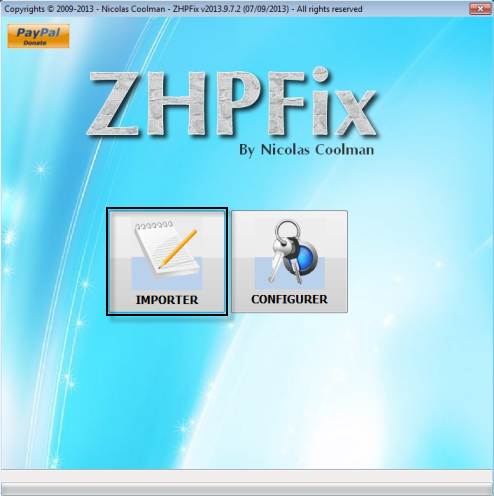
Attention :vérifiez que que toutes les lignes se sont collées
- Puis Cliquez sur "GO"
- Confirmez les nettoyages des données en cliquant sur "Oui"

Le nettoyage s'effectue, ne touchez à rien pendant cette étape, si le programme demande un redémarrage du pc > faites le !
- Une fois le scan terminé le fichier ZHPFixReport à été crée sur le bureau.
- Hébergez le rapport ZHPFixReport
Télécharger Junkware Removal Tool par Thisisu sur le bureau
Sur la page clique sur Download Author site!
Désactivez vos protections: antivirus, ... Ferme toutes les applications en cours (notamment votre navigateur)
- Pour Vista/7/8, clique droit sur l'icône JRT exécuter en tant qu'administrateur.
Une fenêtre va s'ouvrir, appuie sur une touche pour continuer...
Le scanne va ce lancer.
Note : Le bureau disparaitra un instant, c'est normal.
Au message The scan completed successfully
Attendre l'affichage du rapport il sera enregistré sur le bureau
- Héberge le rapport
importante Ne pas relancer l'outil une seconde fois sinon le rapport sera écrasé par un nouveau Puis vous allez refaire un diagnostic de votre ordinateur avec l'outil
ZHPDiagA+





